

 1 hour ago
7
1 hour ago
7
ARTICLE AD BOX

Google is several of Chrome’s latest AI features, including Gemini in Chrome, to users across India. These features, built on the company’s latest Gemini 3.1 model, aim to help people get and understand information quickly and more efficiently without having to juggle between multiple tabs.
Furthermore, as part of this expansion, Google is rolling out support for over 50 languages, including several Indic languages: Hindi, Bengali, Gujarati, Kannada, Malayalam, Marathi, Telugu, and Tamil. These features will be available first on desktop and iOS. According to Charmaine Dsilva, director, product management for Chrome, with Gemini built directly into Chrome, using AI to surf the internet and getting information becomes “more intuitive, secure and helpful, and for users to have more proactive and intelligent experiences.”
Notably, India is one of the first markets, along with Canada and New Zealand, after the US (launched in September) to get this experience.
How Google ‘Gemini in Chrome’ works
One of the best use case of Gemini in Chrome is chatting with browsing assistant without switching tabs. With Gemini in Chrome, users can multi-task and instantly get help with whatever they’re working on, without having to switch tabs. Users can click the “Ask Gemini” icon in the top right corner, and a side window opens on the right side of the the current tab.
Chrome’s built-in AI can help summarise lengthy web content, for example, a press release, perform tasks like asking Gemini to “find suitable case for Pixel 9 Pro XL on Amazon”, and even remember pages users have previously visited.
Gemini in Chrome: First impressions
If you use Gemini on a regular basis, you’ve likely felt the ‘tab-switching’ struggle: finishing one task here, only to realise you have to jump over to a different tab for the next. As mentioned, we tested the “Ask Gemini” to search for case for Pixel 9 Pro XL.
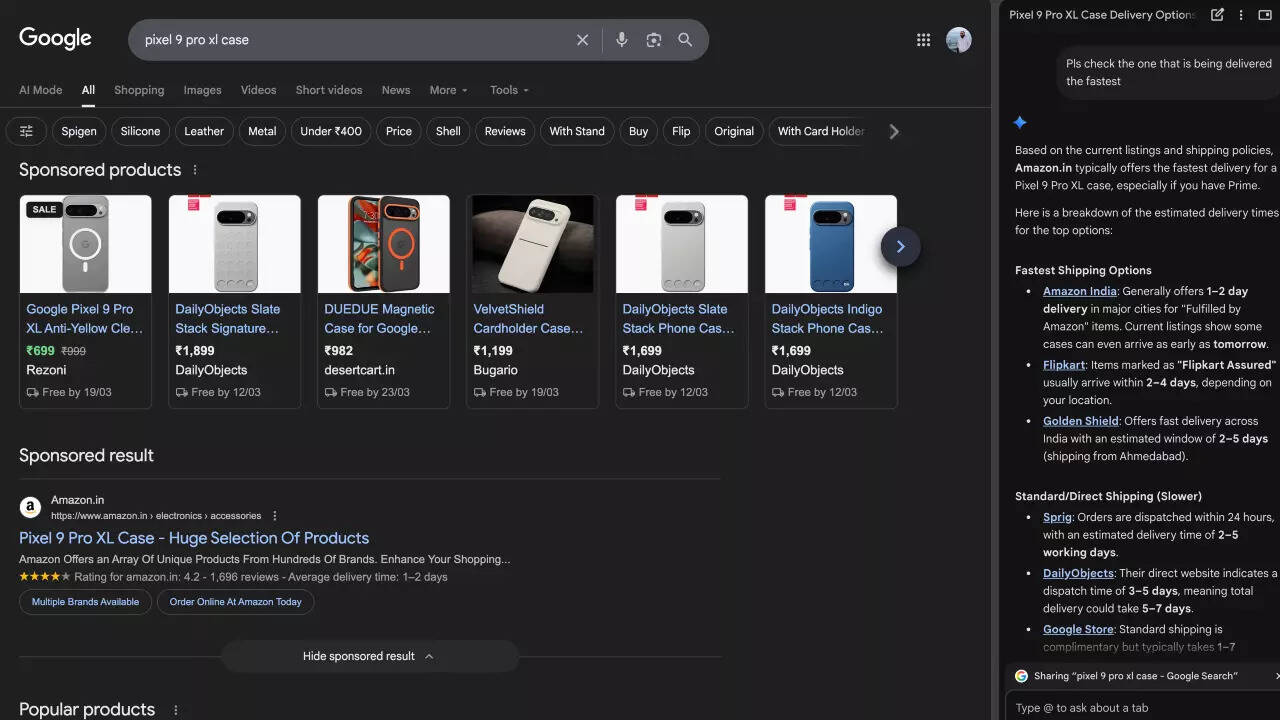
“Search for Pixel 9 Pro cases”, we wrote, and Gemini gave a quick analysis:• The Best Value: The Caseology Nano Pop (by Spigen) is currently a steal at under 71,000 on Flipkart. It has an excellent 4.7-star rating and is "Flipkart Assured," meaning it has passed quality checks and ships quickly.• The Most Durable: If you're prone to drops, the Ringke Onyx is highly regarded for its"sandstone" grip and military-grade protection. It is frequently available for next-day delivery on Amazon.• The Clean Look: DailyObjects offers a clear shockproof case that maintains the phone's original look while providing solid protection.Note: Prices on these platforms fluctuate daily. Most Spigen-branded cases (like Liquid Air) are currently hovering just above 71,500, but their sub-brands like Caseology and Cyrill fit perfectly in your budget.We then refined our search: “Pls check the one that is being delivered the fastest”, and it found certain options for us. “Find a case that is priced under Rs 1500, delivers fast and has 4+ reviews on Amazon and Flipkart,” we wrote to further test the AI feature’s prowess. It responded with some options and a message:“Based on your budget of Rs 1,500 and the need for high ratings and fast delivery, here are the best options currently available. Since you are in Noida, Amazon typically offers the fastest turnaround (often next-day), while Flipkart Assured items usually take 2-3 days.”
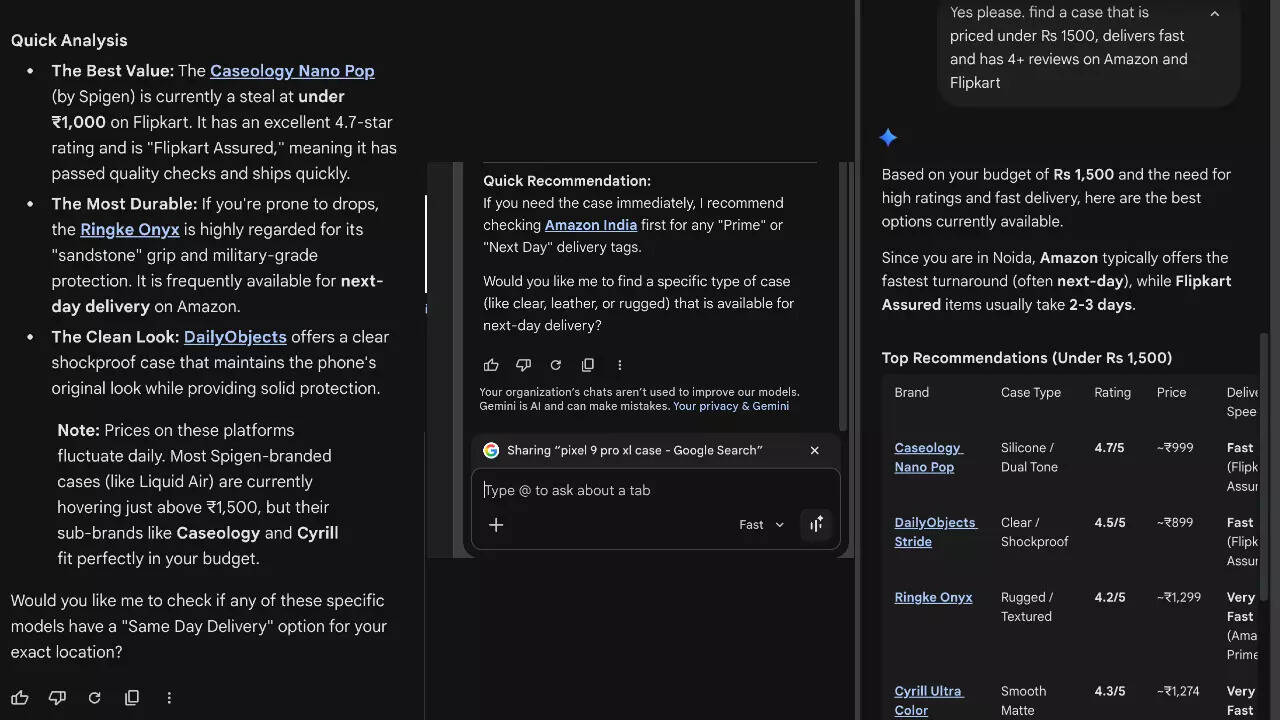
Gemini also gave a “Quick Recommendation” with an option to find a specific type of case.“If you need the case immediately, I recommend checking Amazon India first for any "Prime" or "Next Day" delivery tags. Would you like me to find a specific type of case (like clear, leather, or rugged) that is available for next-day delivery?”This is because Chrome is deeply integrated with popular apps, including Gmail, Maps, Calendar, YouTube and more, which allows it to provide users speed to undertake tasks like schedule meetings on their Calendar, see location details from Maps and ask questions about YouTube videos. When using it with Gmail, users can compose and send emails without leaving their current page – by just opening the side panel and ask to send an email.
Gemini in Chrome works across multiple tabs and edit Photos with Nano Banana 2
Gemini in Chrome can also work across multiple open tabs, so users can easily cross reference and consolidate information into a single view. Google has also built Nano Banana 2 directly into Chrome so that users can transform images on the go. Just like it is done in Gemini AI chatbot, users can type a prompt in the side panel to explain what they’re trying to do. Nano Banana 2 understands the command and transforms the photo without needing to upload files or open a new tab. Responding to a question about security, Dsilva said that Gemini in Chrome is designed with security in mind from the start. “We’ve trained our models to recognize known threats, like prompt injection, in order to keep users safe as they browse. We’ve also built safeguards to ask for confirmation before taking certain sensitive actions, like sending an email or adding an event to your calendar,” Google said.Google says it uses automated red-teaming to strengthen protections, and Chrome’s auto-update feature allow it to get fixes out quickly.






 English (US) ·