

 1 hour ago
4
1 hour ago
4
ARTICLE AD BOX
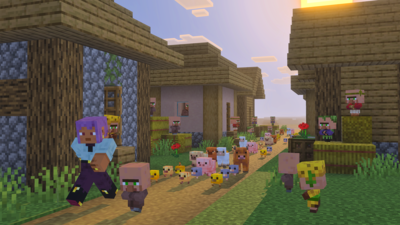
Mojang has officially released the Minecraft Bedrock 26.10 update, and the same has brought the highly anticipated Tiny Takeover game drop. Essentially, the new release has overhauled baby mobs, while also adding golden dandelions, craftable name tags, and more.The update also enhanced overall performance and introduced quality-of-life changes. It is now available for download on all platforms, and you can complete the process to experience all the new content.The section below provides a detailed guide on how you can download the Minecraft Bedrock 26.10 update.
How to download Minecraft Bedrock 26.10 on all platforms
Watch
Minecraft 26.10 OUT NOW - All Features
Minecraft Bedrock 26.10 update is finally out, and you can download it on your devices to try out all the new features. The following is a detailed guide on getting the update on all the platforms:
PlayStation 4 and PlayStation 5
- To start, navigate to the console's homepage and find Minecraft. You can alternatively search for the game in your library.
- As the next step, you must tap on the Options button on your controller and choose "Check for Updates."
- Once the Minecraft Bedrock 26.10 update is found, you can start the installation process.
Xbox One and Series X|S
- For downloading the Minecraft Bedrock 26.10 update on Xbox One and Series X|S, you must go to the “My Games & Apps” section on your console’s library.
- You will then have to find Minecraft and tap on the Options button.
- Finally, under “Manage Game & Add-Ons,” you must click “Updates.”
- The new version will then be downloaded on your Xbox console.
Nintendo Switch / Switch 2
- First, you must launch Minecraft on your Nintendo Switch / Switch 2.
- You will subsequently find a notification for a new game update.
- Tap on the pop-up. It will take you to the Nintendo eShop, where you can update the game to the latest 26.10 version.
PC (Windows) via Minecraft Launcher
- You can download the Minecraft Bedrock 26.10 update directly through the game’s launcher. It checks for updates by default every time the application is launched.
- Accordingly, if a newer build is found, the Minecraft Launcher will automatically download it.
- If you don’t have the launcher, you can go over to Mojang’s website and download the file.
Android and iOS (Pocket Edition)
- To download the Minecraft Bedrock 26.10 update on mobile devices, you will have to either open the Apple App Store or the Google Play Store.
- You may then search for the game on the relevant app store.
- You will see an “Update” option, allowing you to download the game’s latest version.
This was all you needed to know about downloading the Minecraft Bedrock 26.10 update.







 English (US) ·