

 2 days ago
5
2 days ago
5
ARTICLE AD BOX
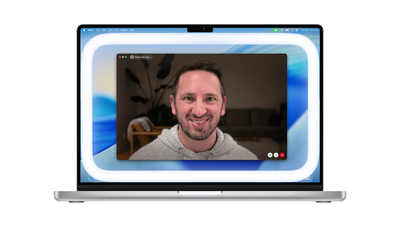
Apple's new macOS 26.2 update introduces Edge Light, a clever feature turning your Mac's screen into a virtual ring light for better video calls. This innovation uses the screen's edges to illuminate faces in dim settings, automatically adjusting for optimal lighting. Users can personalize brightness and color temperature, enhancing video quality across all conferencing apps.
Apple has rolled out Edge Light, a new video conferencing feature in macOS 26.2 that transforms your Mac's display into a virtual ring light. The feature, available on all Apple silicon Macs, uses the screen's borders to illuminate faces during video calls in low-light conditions.Edge Light creates a bright, rounded rectangle around the screen edge that provides fill lighting for video calls. The feature intelligently recedes when users move their mouse pointer near it, ensuring uninterrupted access to on-screen content. Users can customize both the brightness level and color temperature, adjusting between warmer (more yellow) and cooler (more blue) tones to suit their preferences.The feature leverages Apple's Neural Engine to detect faces and their positioning in the camera feed, while the Image Signal Processor analyzes ambient light levels to automatically adjust brightness. Mac models introduced in 2024 or later include an additional capability to automatically activate Edge Light when low-light conditions are detected.
How to use Edge Light feature on Macs
To activate Edge Light, click the camera icon in the menu bar during an active video call and toggle the Edge Light option.
Once enabled, click the arrow next to Edge Light to access additional controls including brightness and color temperature sliders.The feature works with both built-in cameras and external cameras connected through Continuity Camera. For built-in cameras, the effect appears on the Mac's display, while external camera setups show the effect on the primary display.Note: Edge Light requires macOS 26.2 or later and is compatible with all Apple silicon Mac models. Edge Light joins Apple's existing suite of built-in video effects, including Studio Light, Portrait mode, virtual backgrounds, and Voice Isolation.









 English (US) ·